
Gerrit
What is Gerrit and why do people like it?
Gerrit is a code review system from Google in a similar style to Google's internal Critique tool, but based on Git, and publicly available as open source. It hosts a Git repo with the ability to submit changes for review and offers mirroring to other repos (like https://git.lix.systems/lix-project/lix). It has an entirely different review model to GitHub (and Forgejo, GitLab, etc that copy GitHub's review model), where, instead of pull requests, you have changelists (CLs): reviews on individual commits, with each revision of a commit being a different "patchset", rather than reviewing an entire branch at a time. CLs may be merged one by one or in a batch.
Although this has some learning curve, we expect that you will find it pleasant to work with after figuring it out. It has some rough edges and strong opinions that take some getting used to, but it has served us well and saved us an inordinate amount of time both as reviewers and change authors. The rest of this document gives some pointers on the workflows we use with Gerrit.
People like Gerrit because it makes the following things trivial or easy, all of which are somewhere between annoying and impossible on GitHub modeled systems:
Gerrit produces better code:
git revise -c or other tools; since there are no PR dependencies or branches to worry about, splitting commits is no longer a big ask.
Gerrit makes reviewers' lives easier and reduces review round trips:
Gerrit makes your life easier as a contributor:
main smaller.
Gerrit makes it clear which comments still need action in a clean way, compared to GitHub where resolved comments get regularly broken or disappear altogether.
Gerrit guesses (with reasonable accuracy) who a change is blocked on and shows it on the dashboard with a little arrow next to their name, allowing you to see at a glance which changes are your responsibility at a given time.
There is a rebase button that just works. Trivial non-conflicting rebases do not require a rereview.
That being said, there are some downsides:
nix develop automatically does that for you.
Learning materials
- https://gerrit-review.googlesource.com/Documentation/intro-user.html
- https://docs.google.com/presentation/d/1C73UgQdzZDw0gzpaEqIC6SPujZJhqamyqO1XOHjH-uk/view
Our installation
Gerrit is at https://gerrit.lix.systems
The Gerrit SSH server is running on port 2022. The repo URLs are:
-
ssh://{username}@gerrit.lix.systems:2022/lix -
https://gerrit.lix.systems/lixif using HTTP auth; see Gerrit settings for setting an HTTP password if desired
Hit the d key on any change to download it, which will give you the right URLs.
Basic workflow for a change
The unit of code review is a "change", which yields a single commit when "submitted" (merged). The commit message is taken from the change description in Gerrit; in our experience this tends to lead to more comprehensive commit messages.
For a change to be merged, it must have the following four "votes", in Gerrit's terminology:
- Set by reviewers:
- +2 Code-Review: the committer that reviewed this thinks it can be submitted as-is (all users can vote +1/-1, expressing a weaker view on code acceptability)
- +1 Has-Release-Notes: means the reviewer thinks your commit added relevant release notes for that commit, or that it does not need any. This serves primarily as a reminder; you can set this yourself if you wish.
- +1 Has-Tests: means the reviewer thinks your commit added all the tests that commit needs, or that it does not need additional tests. Like Has-Release-Notes, this serves primarily as a reminder and can be set by change authors.
- Set automatically by CI:
- +1 Verified: means CI successfully built for all our platforms and passed all tests
If you're newly part of the core team you will need to add yourself to the Gerrit lix group, otherwise you can't set the Has-Release-Notes or Has-Tests labels. If you're not, this doesn't affect you.
When all of those labels are set, a change becomes Ready to submit, in Gerrit's termology, and Gerrit will give you a Submit button in the top right:
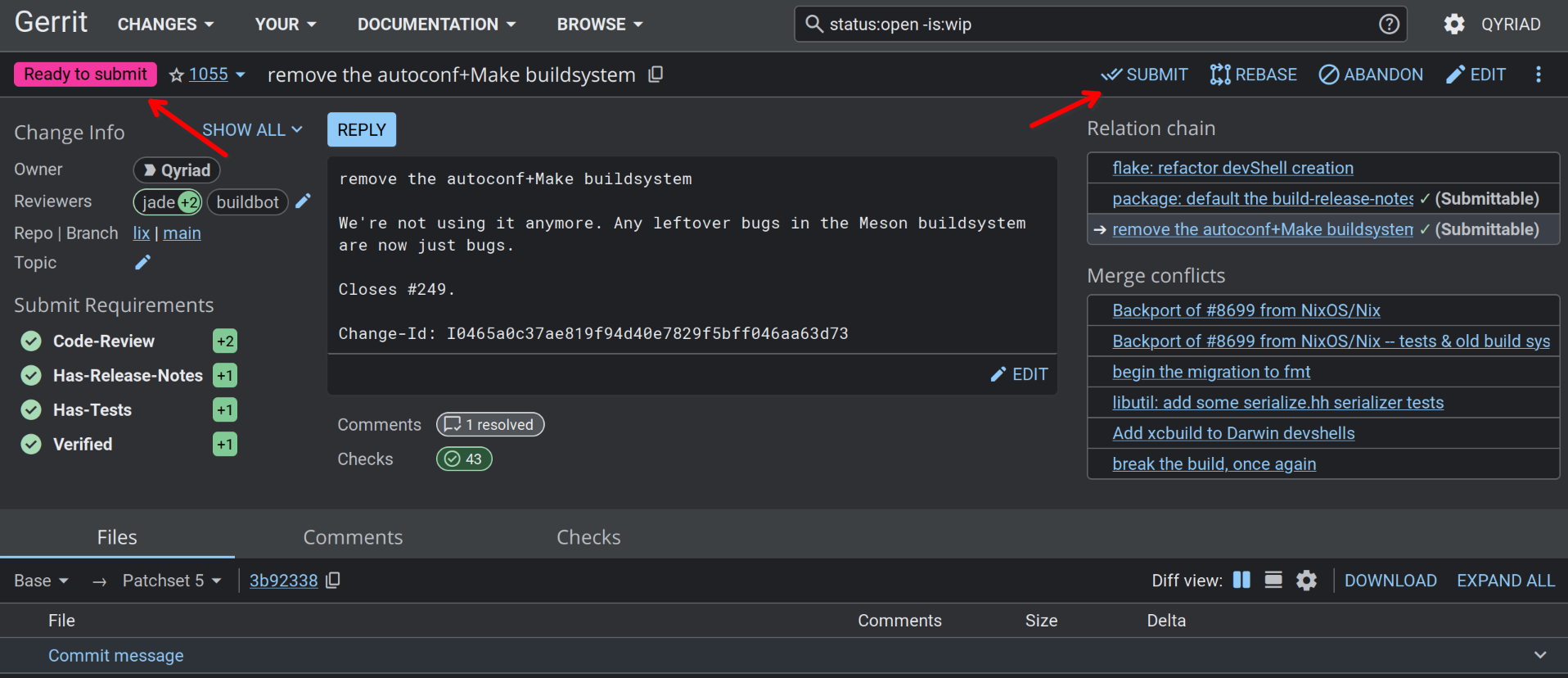
By convention, the change author has the final say on clicking the Submit button (note: this is the opposite of the Github convention), and there is no special permission to merge a change once it has been fully reviewed (the permissions are in the reviewer +2'ing it). This gives you a last chance to have a look at your change before merging it.
Workflow tips
Local branches and commits
Gerrit is very mean to you if you don't have your local commit history in a linear presentable state, which takes getting used to but it is very low overhead once you get used to it. In short, amended commits become "patchsets", new commits become changes, and multiple commits help link your changes together as a "relation chain".
Note: if you're coming from Chromium, this is different to how they use Gerrit, where multiple commits become patchsets, and only the first commit on a local branch creates a new change.
Gerrit’s commit-msg hook generates a new Change-Id for each commit you make, which in turn creates a new change that gets reviewed separately. To update an existing change after review feedback, amend or squash your changes into your old commit, keeping its Change-Id unchanged, then push.
Consider not pushing for review before it is clean, or split commits up with git-revise (good) or jj (better) after the fact, amending as you work. If you want a backup of your changes, you can fork it on Forgejo and push to that fork.
Pushing
If you cloned the repo from Forgejo, be sure to change your remote URL to point to Gerrit before continuing.
Assuming your remote is called origin (which is the default):
git remote set-url origin ssh://{username}@gerrit.lix.systems:2022/lix
Then you can push to Gerrit with:
git push origin HEAD:refs/for/main
If you get tired of doing this every time, you can automate it by setting the .git/config as follows:
git config remote.origin.push HEAD:refs/for/main
You will have to do that in each fresh check-out. Once it's done, git push will work without additional options.
If you get a “remote unpack failed” error while pushing, run git fetch then try again.
If you wish to push a change and immediately mark it as WIP, you can push with -o wip, or make that the default behavior by checking Set new changes to "work in progress" by default in Gerrit's user settings, under "Preferences".
Topics
A Gerrit topic may be set on push with:
git push origin HEAD:refs/for/main%topic=foo
Which will create all pushed changes with the topic "foo". Topics are helpful for grouping long series of related changes.
Pulling
Pulling from Gerrit will work normally. It's worth keeping in mind that sometimes a CL you're working on has been edited in the web UI or by another contributor, so the commit in your repo isn't the latest. Rebasing will usually make the duplicate go away; this is part of the normal rebase semantics, not Gerrit magic. You might consider making rebase-on-pull your default.
Sandbox branches
This feature has some notable ways to shoot yourself in the foot. We still support it, since it allows for running CI builds on things before they become proper CLs. If you don't need that and don't want to worry about the footguns, consider using a branch on a Forgejo fork for sharing WIP code.
In particular, if a commit is in any branch already including a sb/ branch, it will be rejected with the error "no new changes" if it is later pushed to refs/for/main. This can be worked around by amending all the commits so they are distinct, or by git push origin HEAD:refs/for/main%base=$(git rev-parse origin/main), which forces the merge-base
Use refs/heads/sb/USERNAME/*.
CI rerun
Push the CL again with a no-changes commit amendment if you want to force CI to rerun.
Finding CLs to review
Consider bookmarking: https://gerrit.lix.systems/q/status:open+-is:wip+-author:me+label:Code-Review%3C2